Last reviewed: September 30, 2026.
Reading time: About 8 minutes.
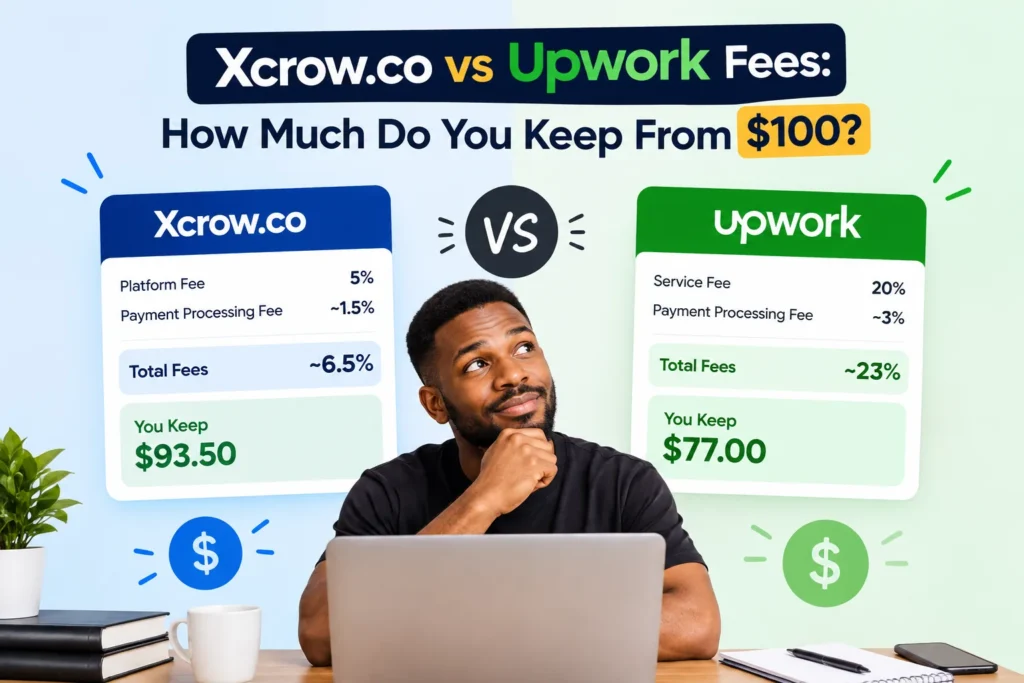
If a client pays $100 for freelance work, the amount you finally receive may be lower after platform fees and payment-method charges. This guide explains what Upwork is, how Upwork works, what Xcrow.co is, how Xcrow works, and how the two platforms compare using the stated fee information available for this article.
The calculations below separate platform deductions from payment-provider charges. That distinction is important because Payoneer, PayPal, a bank, or another payment method may deduct additional charges after the platform fee. The amount shown as remaining after a platform deduction is therefore not always the same as the final amount deposited into your account.
What is Upwork?
Upwork is an online freelance marketplace that connects clients with independent professionals. Businesses and individuals can use the platform to find freelancers for services such as writing, design, software development, marketing, virtual assistance, translation, consulting, and many other types of work.
A freelancer normally creates a profile, presents relevant skills and work history, searches for suitable opportunities, and submits proposals or responds to invitations. A client reviews applications, communicates with candidates, chooses a freelancer, and creates either an hourly or fixed-price engagement. The work, messages, milestones, and payment activity are managed through the platform according to the applicable contract and account terms.
How Upwork works for freelancers
- Create and complete a professional profile.
- Search for projects that match your skills, experience, schedule, and preferred rate.
- Submit a proposal or respond to a client invitation.
- Discuss the scope, deadline, deliverables, and payment terms with the client.
- Accept an hourly or fixed-price contract through the platform.
- Complete the agreed work and submit it according to the contract.
- Receive the amount remaining after the applicable Upwork fee.
- Withdraw the balance using an available payment method, subject to that method’s charges and requirements.
Upwork can provide access to a large range of freelance opportunities, but freelancers should calculate the complete cost of winning and completing a project. Proposal-related costs, platform fees, withdrawal charges, currency conversion, taxes, and other account-specific costs may affect the overall result.
What is Xcrow.co?
Xcrow.co is an online escrow platform designed to help clients and freelancers manage project payments. Escrow means that funds are held during the agreed transaction process and released according to the conditions of the project. This structure can give both parties a clear payment workflow before work is completed and accepted.
On Xcrow.co, a client and freelancer can agree on the project scope, price, deliverables, and release conditions. The client funds the transaction, the freelancer completes the agreed work, and the funds become available according to the platform’s escrow process and applicable terms.
How Xcrow.co works
- The client and freelancer agree on the work, price, deadline, and deliverables.
- The client funds the project through the platform’s escrow process.
- The freelancer works on the agreed deliverables.
- The completed work is submitted for review or acceptance according to the project terms.
- Funds are released when the applicable release conditions are met.
- The freelancer withdraws the available balance through a supported payment method.
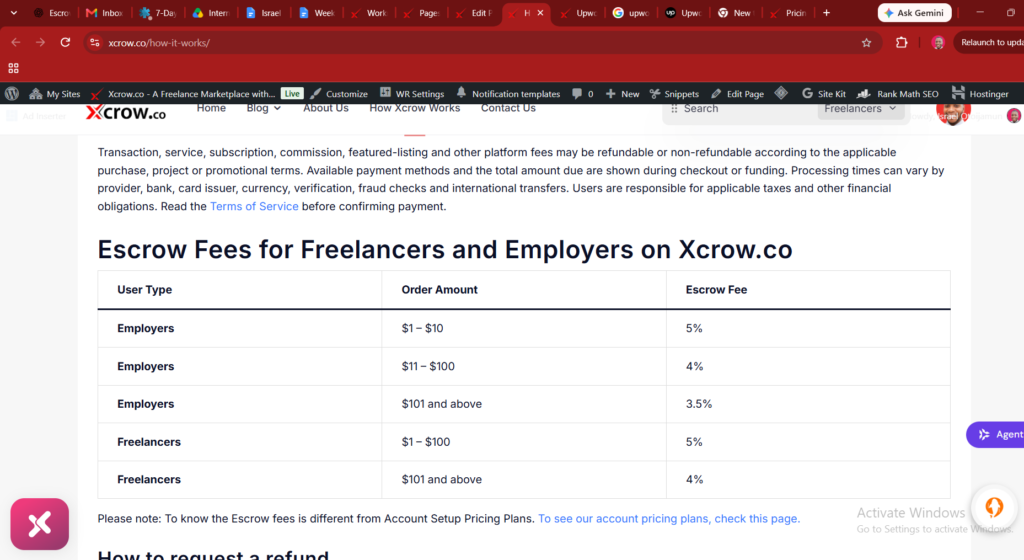
For the current explanation of the escrow process and the fee used in this article, review the How Xcrow Works page. The final amount received can still depend on the selected withdrawal method and any charge applied by that provider.
Upwork fee on $100
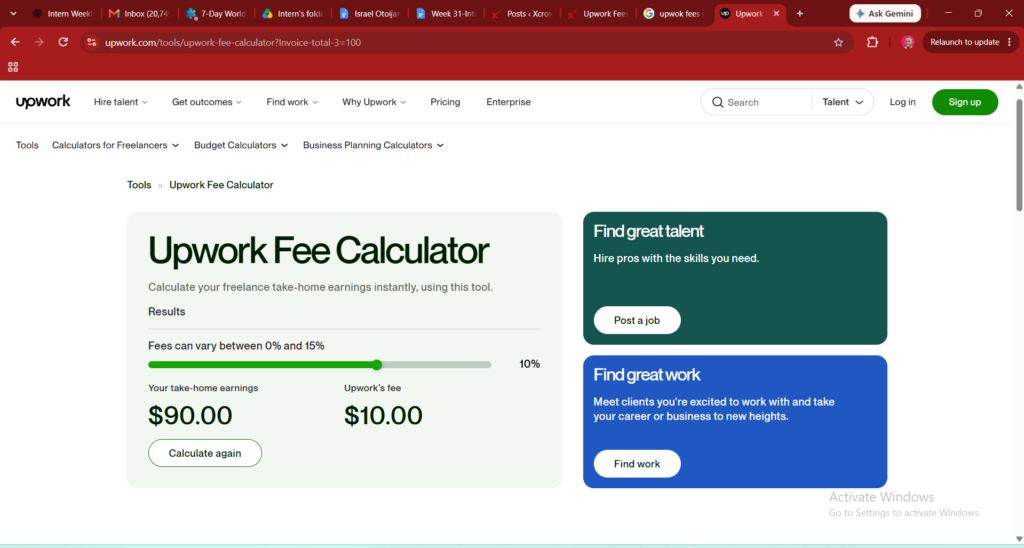
According to the Upwork Fee Calculator, Upwork fees can vary between 0% and 15%. For a $100 earning at a 10% fee rate, the fee charged on that amount is $10.
| Upwork calculation | Amount |
|---|---|
| Gross earning | $100.00 |
| Upwork fee at 10% | −$10.00 |
| Amount after the Upwork fee | $90.00 |
This calculation leaves $90 after the 10% Upwork fee and before payment-method charges. The applicable Upwork fee may be different because the stated range is 0% to 15%. Always check the fee shown for the specific transaction rather than applying the 10% example to every project.
Upwork payment-method charges
After the platform fee is deducted, your payment method may charge separately. Payoneer, PayPal, a bank, or another method might deduct a withdrawal fee, processing charge, currency-conversion fee, or exchange-rate spread. If that happens, the final take-home amount can be lower than $90.
Xcrow.co fee on $100
According to the fee information stated on the How Xcrow Works page, if you earn $100 on Xcrow.co, the amount available to withdraw after the stated escrow fee is $95.
| Xcrow.co calculation | Amount |
|---|---|
| Gross earning | $100.00 |
| Stated escrow fee | −$5.00 |
| Amount available to withdraw | $95.00 |
The stated calculation leaves $95 available to withdraw before charges from the payment method. This is the amount after the platform deduction described for this comparison; it is not a guarantee of the exact amount that will arrive in a bank or payment account.
Xcrow.co payment-method charges
Payoneer, PayPal, a bank, or another payment method may deduct its own charges when you withdraw. Those charges are separate from the Xcrow.co escrow fee. Consequently, your final take-home amount might be less than $95.
Upwork vs Xcrow.co: similarities and differences
| Feature | Upwork | Xcrow.co |
|---|---|---|
| Primary purpose | Freelance marketplace connecting clients and freelancers | Escrow-based platform for managing project payments |
| Finding work | Freelancers search for projects and submit proposals or receive invitations | Clients and freelancers arrange a project and use the escrow workflow |
| Project agreement | Hourly or fixed-price contracts | Agreed project scope, price, deliverables, and release conditions |
| Payment process | Payment is processed according to the contract and platform rules | Client funds are handled through the escrow process and released under the project conditions |
| Platform deduction in this example | 10% of $100, or $10 | $5 from $100, leaving $95 available to withdraw |
| Payment-method charges | May be deducted separately by Payoneer, PayPal, a bank, or another method | May be deducted separately by Payoneer, PayPal, a bank, or another method |
| Best comparison point | Final amount after the applicable fee and withdrawal costs | Final amount after the stated escrow fee and withdrawal costs |
Both platforms can involve clients, freelancers, agreed deliverables, online payment processing, and withdrawals. The main difference is the workflow. Upwork is primarily a marketplace where freelancers search and apply for opportunities, while Xcrow.co uses an escrow-focused process for project funding and release.
Upwork vs Xcrow.co: $100 comparison
| Platform | Gross earning | Stated platform deduction | Amount before payment-method charges |
|---|---|---|---|
| Upwork at 10% | $100.00 | −$10.00 | $90.00 |
| Xcrow.co | $100.00 | −$5.00 | $95.00 |
Using these stated figures, Xcrow.co leaves $5 more than Upwork at a 10% fee before payment-method charges. This does not mean every freelancer will receive the same final amount. The actual result depends on the fee that applies to the transaction, the withdrawal route, the currency, conversion costs, and any other applicable charge.
What can reduce your final take-home amount?
Platform fees
The platform fee is the first deduction to check. On Upwork, fees can vary between 0% and 15%, while this Xcrow.co comparison uses the stated $5 deduction from a $100 earning. The fee displayed for your specific transaction should take priority over a general example.
Withdrawal fees
A payment provider may charge when funds are transferred to your account. The charge can vary by country, currency, account type, transfer method, and provider terms. Check the withdrawal screen before confirming.
Currency conversion
If your project currency differs from the currency of your bank or payment account, conversion may affect the final amount. A provider may apply an exchange rate, conversion fee, or spread. Compare the amount received in your own currency, not only the original dollar balance.
Taxes and business costs
Platform calculations do not automatically determine your tax liability. Your obligations depend on your location, business structure, income, and local rules. Keep records of earnings, platform fees, invoices, withdrawal costs, and other business expenses, and seek qualified professional advice when necessary.
How to choose between Upwork and Xcrow.co
Start with the type of work and payment workflow you need. Upwork may be suitable when you want to search a marketplace, submit proposals, build a profile, and use hourly or fixed-price contracts. Xcrow.co may be suitable when you and a client already have an agreement and want to use an escrow-based process for project funding and release.
Next, compare the total cost. Do not compare only the headline platform percentage. Use the same project value, currency, payment method, and date. Then record the platform deduction, withdrawal charge, conversion cost, and final amount available to you.
Finally, review practical factors such as client access, contract terms, payment timing, dispute procedures, verification requirements, project milestones, and the quality of the transaction records. A lower platform deduction may not be the only factor that matters for a successful freelance relationship.
When Upwork May Make More Sense
Xcrow.co is designed to provide an alternative for freelancers and clients, particularly for Africa-focused and international freelance work. However, Upwork may be a better fit for some users depending on their priorities.
You may prefer Upwork if:
- You want access to a large established marketplace. Upwork has been operating as a global freelance marketplace for many years and connects clients with freelancers across a wide range of categories.
- You want to work with clients who already use Upwork. Some businesses and organizations have established hiring processes around Upwork and may prefer keeping their freelance projects on the platform.
- You need a broad range of specialized services. Upwork covers many professional categories, including software development, design, writing, marketing, consulting, finance and administrative services.
- You value an established platform ecosystem. Upwork provides features for finding projects, submitting proposals, managing contracts and receiving payments within its platform.
- You already have an established Upwork profile. Freelancers who have built reviews, completed projects and developed a client history on Upwork may prefer to continue using that existing reputation.
The choice therefore does not have to be either-or. A freelancer can use multiple marketplaces and compare the fees, available projects, payment options, client quality and overall experience on each platform.
Before choosing a marketplace, consider not only the headline platform fee but also withdrawal charges, currency conversion costs, taxes where applicable, the availability of suitable projects and how easily you can build relationships with clients.
Checklist before accepting a $100 project
- Confirm whether the $100 is the gross project amount or the amount after deductions.
- Check the platform fee that applies to your specific transaction.
- Calculate the balance after the platform deduction.
- Review Payoneer, PayPal, bank, or other payment-method charges.
- Check the exchange rate and any currency-conversion cost.
- Confirm the payment, milestone, and release conditions.
- Review the amount available to withdraw before completing the transaction.
- Save the agreement, invoice, receipt, and payout record.
- Never share passwords, one-time codes, private keys, or wallet credentials.
- Do not pay an unexpected unlocking fee to receive a supposed payment.
Frequently asked questions
What is Upwork?
Upwork is an online freelance marketplace where clients can find independent professionals and freelancers can apply for projects. Work may be arranged through hourly or fixed-price contracts.
What is Xcrow.co?
Xcrow.co is an escrow-based platform for managing project payments between clients and freelancers. Its workflow is based on agreed work, project funding, deliverables, and release conditions.
How much do you keep from $100 on Upwork?
At a 10% fee, $10 is deducted from $100, leaving $90 before payment-method charges. Because Upwork fees can vary between 0% and 15%, your applicable amount may differ.
How much can you withdraw from $100 on Xcrow.co?
Using the fee stated on the How Xcrow Works page, $95 is available to withdraw from a $100 earning before payment-method charges.
Can Payoneer or PayPal reduce the amount?
Yes. Payoneer, PayPal, a bank, or another payment method may deduct separate charges. Your final take-home amount can therefore be lower than $90 on the Upwork example or $95 on the Xcrow.co example.
Which platform leaves more from $100?
Using the stated figures, Xcrow.co leaves $95 and Upwork at a 10% fee leaves $90 before payment-method charges. The final result depends on the transaction and withdrawal method.
Conclusion
Upwork and Xcrow.co support different freelance payment workflows. Upwork is a marketplace for discovering projects and managing hourly or fixed-price contracts. Xcrow.co uses an escrow-focused process for agreed projects, funding, deliverables, and payment release.
For a $100 earning, the Upwork Fee Calculator shows that a 10% fee leaves $90 before payment-method charges. The fee information on How Xcrow Works leaves $95 available to withdraw from $100 before payment-method charges. Payoneer, PayPal, a bank, or another method may deduct additional charges, so verify the final amount before withdrawing.
This article is written for general informational purposes with clear headings, original explanatory content, comparison tables, and reader-focused answers. No article can guarantee AdSense approval. Approval also depends on the overall website, original content across the site, navigation, privacy and legal pages, user experience, traffic quality, technical setup, and compliance with Google’s current policies.
Disclaimer: Fees, payment-method charges, platform terms, and policies can change. This comparison uses the stated figures and does not include charges that may be applied by your selected payment provider. Verify the live transaction details before accepting work or withdrawing funds.
Recommended Articles
Why We Built Escrow Into Xcrow: A Guide to Safer Freelance Payments
How Xcrow Escrow, Milestones, and Disputes Work: A Practical Guide
XCrow vs Fiverr vs Upwork: A Factual Comparison of Freelance Marketplaces
How to Withdraw Freelance Funds in Nigeria: A Practical Guide

Israel Otoijamun is the founder of Xcrow, an AI-powered freelance marketplace connecting businesses with remote professionals. He has over 15 years experience in digital business, freelancing, technology, and online platforms. He writes about freelancing, remote work, hiring, digital payments, and the future of online work.